Key-J
Every key you press plays a note, in whatever program is already in front of you. Type an email and hear a melody; import guitar tablature and watch it play itself on a live staff.
What it does
Your keyboard becomes an instrument. Every keystroke plays a note, the notes land on a staff as you go, and the session exports as a WAV. With global capture on it hears your keys in any application.
Tablature import
Paste guitar tablature, choose a tuning, and Key-J converts the frets to notes. Sequence mode then plays that run one note per keystroke, so the pitches are handled and what is left to you is timing and feel.
Eight tunings including drop D, Eb, DADGAD, seven-string and bass, with a capo offset. Hammer-ons, slides and bends are read as the notes they land on. A block with the wrong number of strings produces no notes and says how many it found, rather than guessing a tuning silently.
The keyboard
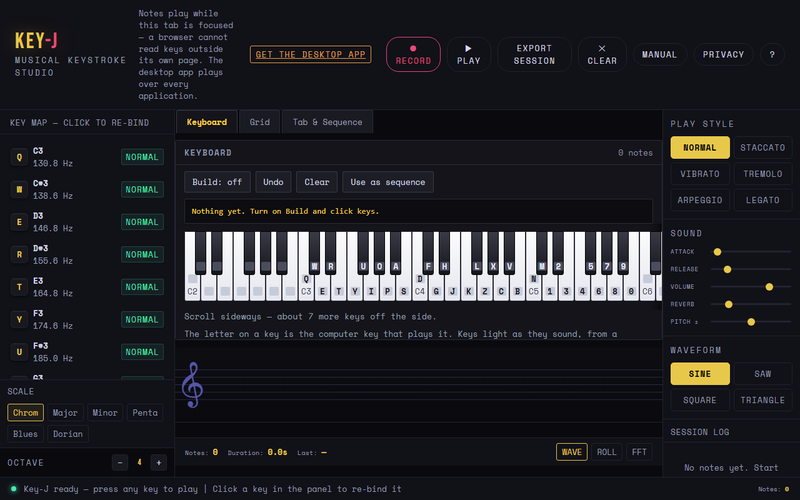
An on-screen keyboard shows which computer key plays which note, printed on the key it triggers, so a wrong binding is visible rather than something you find by ear. Keys light as they sound, from a keystroke or from a sequence.
Turn Build on and click keys to enter a run without typing a single note name - which is the part that made entering a sequence miserable.
Also
Seven tone presets from clean guitar to shred. MIDI import. Six play styles, four waveforms, remappable keys and scale switching.
On the command line
Once a song is in, the workbench is in the way. pip install keyj gives you
the same converter and the same player without the window.
pip install keyj
keyj tab solo.txt -o song.txt    tablature in, note names out
keyj render song.txt out.wav     the sequence, at a tempo
keyj show song.txt               what is in a sequence
keyj play song.txt               any keystroke plays the next note
tab, render and show are standard library only and
never touch your keyboard. play is the one part that needs a global hook, so it
is a separate install: pip install "keyj[play]". It runs in the foreground and
stops when you stop it — nothing is added to startup.
It never learns which key you pressed. In sequence mode any key advances, so the player asks whether a key went down and discards everything else. There is no keystroke buffer in it, which is the difference between an instrument and a keylogger.
The CLI is MIT. The desktop and browser apps are not — see the license.
How it works
- Open it, or install itThe browser version needs nothing at all. The desktop build adds global capture, so the notes follow you into any other program.
- Choose a scale and a soundEvery key maps to a note. The mapping is a keycode table, not a guess about your keyboard layout, so it lands the same on every machine.
- Type, or import a tabPlay by typing, or paste guitar tablature and watch it resolve onto a live staff. Export the result as WAV.
What it does
keyj on PyPI and keyjockey on npm.Specifications
| Version | 1.6.0 |
|---|---|
| License | Proprietary |
| Platforms | Browser, Windows, Linux |
| Source | vince-gonzalez/f-keys |
Questions
- Do I need to know music?
- No. Every key is already a note in a scale you pick, so nothing you type is wrong.
- Does it work while I use other programs?
- The desktop build does — that is the reason it exists. The browser version only hears keys while its tab has focus.
- What is the difference between keyj and keyjockey?
- Same reader, two registries:
keyjon PyPI,keyjockeyon npm. Both are generated from the code the app runs, so none of the three can drift apart. - Is it free?
- The browser version is. The desktop build is proprietary and downloadable from the releases page.