
Pixel Staff
An 8-bit composer with no DAW anywhere in it. Place notes on a staff, hear a chiptune, export a WAV or a ringtone. It opens in a browser tab and there is nothing to install.
What it does
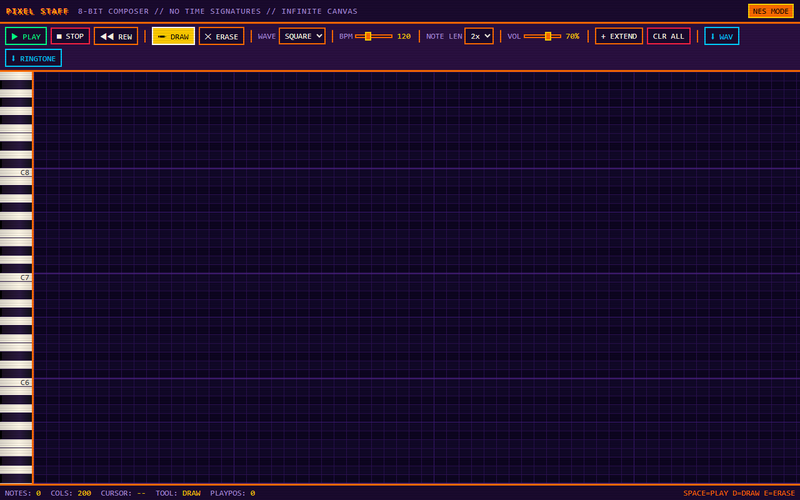
Draw notes onto a 96-row piano roll, pick a waveform per channel, set the tempo and press play. When it sounds right, take it away as a WAV or as a ringtone.
Controls
Draw and erase, play, stop and rewind, tempo in BPM, zoom from 1x to 8x, extend the board and clear it. Square, saw, triangle and sine per channel.
One page, no dependencies. It opens and it works.
How it works
- Open the tabNo download, no account, no project file to create first.
- Place notes on a staffReal notation, not a piano roll. If you can read a line of music you already know the interface.
- Export itWAV for anywhere, or a ringtone straight out.
What you get
No DAW, anywhere in itA digital audio workstation is the correct tool for making an album and the wrong one for writing eight bars of chiptune.
Real notationA staff, not a grid of colored blocks. The knowledge transfers in both directions.
8-bit voicesSquare, triangle, noise — the palette that made the sound worth wanting.
WAV exportThe thing you made comes out as a file.
Ringtone exportBecause that is what a short loop is actually for.
MIT, in the browserRead the source, take it apart, run it yourself.
Specifications
| License | MIT |
|---|---|
| Platform | Browser |
| Install | None |
| Exports | WAV, ringtone |
Questions
- Do I need to read music?
- It helps and it is not required — you can place notes by ear and the staff shows you what you did, which is how people learn to read it.
- Is anything uploaded?
- No. It runs in your browser and the export is a local file.
- Can I use what I make?
- Yes. It is yours.